
Options – Overview
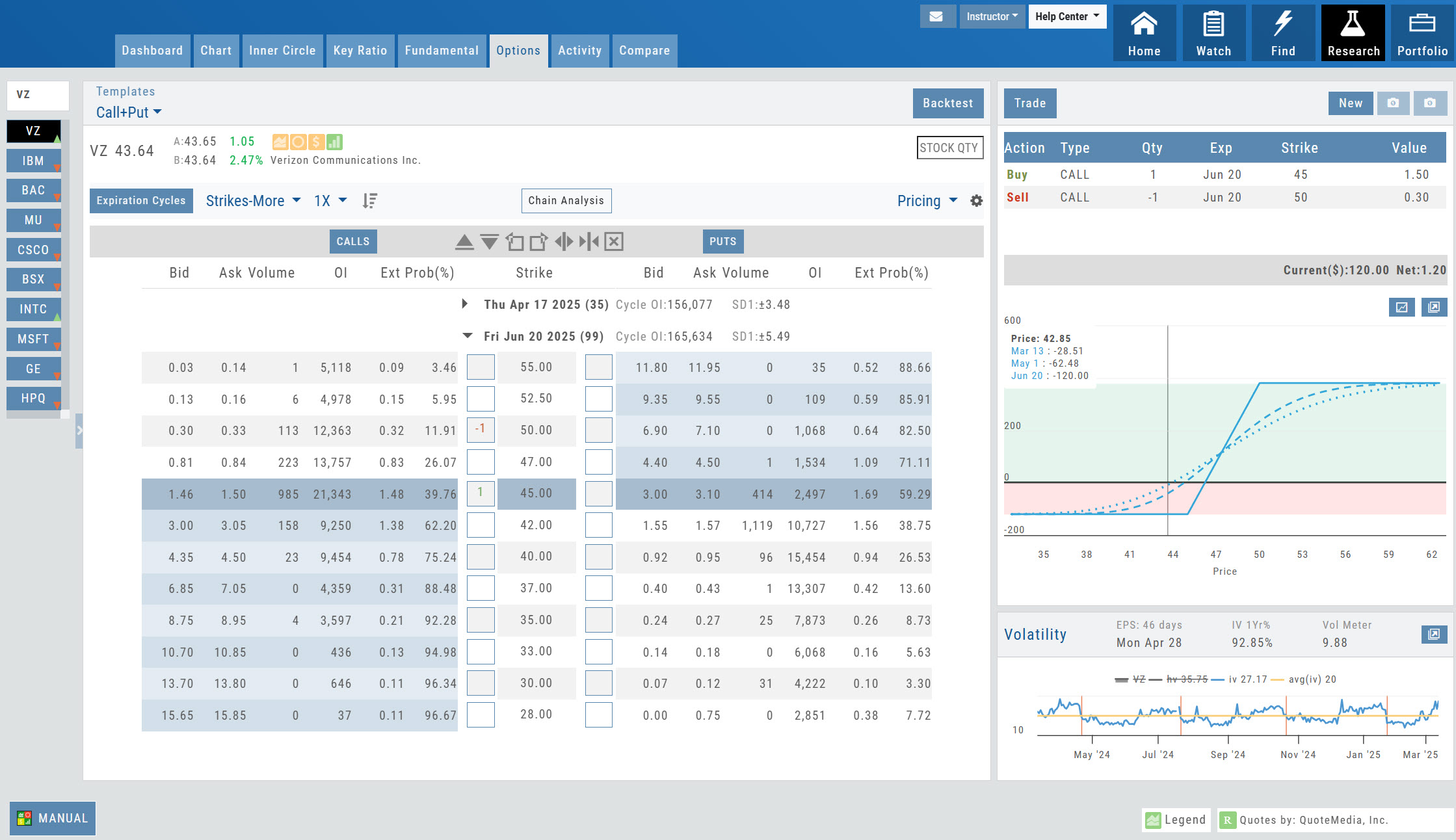


Platform Features Release: Set Alert from Option Tab
This Release focused on fixes and set-ups for future capabilities and added the following: Setting Alerts Enabled from the Option [...]
Posted in Research, Location, Release Notes, alerts, Bug fixes, Options - Overview, Options - Strategies
Tagged research, alerts, options tab
Comments Off on Platform Features Release: Set Alert from Option Tab
Multiple Position Analysis
We often have more than one position on a particular Stock/ETF, so how can each position, or leg be evaluated? [...]
Posted in Research, Positions, Options Chains, Dashboaard, Options - Overview
Tagged options, research, dashboard, positions, analysis, option chain, p/l graph
Comments Off on Multiple Position Analysis
Platform Features Release: August 2022
Announcing the latest Release of feature and functionality enhancements to the trading platform. These allow for more customizing ability and [...]
Posted in Find, Options Chains, Release Notes, Charting, premium, Custom Home Page, Screener, Functionality, Charts, Options - Overview
Tagged charts, research, customize, zoom, option chain, custom home page, screener, weekly options, moving averages, expiration cycles
Comments Off on Platform Features Release: August 2022
Platform Features Release: April 2022
Announcing the updates, additions and edits to the trading platform: Capability to adjust charts for splits When a stock had [...]
Posted in Research, Options Chains, Release Notes, Charting, Functionality, Charts, Options - Overview, Trading
Tagged charts, research, customize, option chain
Comments Off on Platform Features Release: April 2022
Platform Features Release: New Option Chain Functionality/Appearance, Responsive P/L Graph
Features Release Notes: New Option Chain Functionality/Appearance, Responsive P/L Graph Announcing the latest features/functions updates, additions or edits to the [...]
Posted in Research, Options Chains, Options Strategies, Release Notes, Functionality, Options - Overview, Trading
Tagged trading, research, option chain, option strategies, help center
Comments Off on Platform Features Release: New Option Chain Functionality/Appearance, Responsive P/L Graph
Option Chain Functionality
Option Chain Video Research>Option Tab, click on “Expiration Cycle” for the “Call+Put”, “Calls” or “Puts” view. Option Chain Expiration Cycles [...]
Posted in Research, Options Chains, Dashboaard, Options - Overview
Tagged options, research, dashboard, option chain
Comments Off on Option Chain Functionality
Options Navigation
Expirations are displayed above the Option Table. Select the months to view by clicking on the appropriate box. All available [...]
Posted in Uncategorized, Options - Overview
Tagged navigation, menu, How to, options
Comments Off on Options Navigation
Chain Views
Different views are available for options such as Calls + Puts, Calls only or Puts only. Select from the drop-down box or [...]
Posted in Location, Options Chains, Uncategorized, Options - Overview
Tagged navigation, menu, options overview, option chains
Comments Off on Chain Views
Option Tables & Templates
Expanding your Options! Choose from Call+Put chains, Call Matrix, Put Matrix or from almost 2 dozen Option Templates – covering [...]
Posted in Uncategorized, Options - Overview
Tagged navigation, menu, How to, options, templates, option chains
Comments Off on Option Tables & Templates
Create Customized Option Table Views
Create, edit and re-create custom Option Views. This feature allows you to create up to two customized Option Tables. Add/remove [...]
Posted in Options Chains, Options - Overview
Tagged menu, How to, options
Comments Off on Create Customized Option Table Views
Rolling Positions
It’s easier & faster to evaluate your Trade Once you have entered a position, you can easily make adjustments for [...]
Posted in Options Chains, Options - Overview
Tagged navigation, menu, How to, options, icons
Comments Off on Rolling Positions
Entering a Position
You can enter a position to analyze by clicking on ‘Ask’ for buying or ‘Bid’ for selling. You can also [...]
Posted in Options Chains, Options - Overview
Tagged trading, navigation, menu, How to, options
Comments Off on Entering a Position
Where are the Greeks?
You may come across instances on the Options Chain where Delta, Gamma, Theta & Vega fields are blank. This occurs [...]
Posted in Options Chains, Options - Overview
Tagged greeks, option chain
Comments Off on Where are the Greeks?
Go Big – Graphs & Charts
Anywhere you see the ‘Go Big’ icon , you can expand the graphic and access additional information. The Chart Tab under [...]
Posted in Heat Map, Options - Overview
Tagged navigation, menu, How to, icons, heat maps, volatility, graphs
Comments Off on Go Big – Graphs & Charts
Profit/Loss Graphs
Any position entered in the Options Chain (Calls+Puts, Calls or Puts) will automatically display a profit/loss risk graph. The P/L [...]
Posted in Options Chains, Options - Overview
Tagged navigation, menu, How to
Comments Off on Profit/Loss Graphs
Trade from the Options Tab
Trading from the Options Table is easy! When a position is set up on the Option Chain or from one [...]
Posted in Uncategorized, Options - Overview, Trading
Tagged navigation, menu, How to, trade, options overview
Comments Off on Trade from the Options Tab
Trading from the Option Template
From Template to trade is easy. Simply click the “Trade” button on the Option Template and the Order Ticket [...]
Posted in Uncategorized, Options - Overview, Options - Advanced, Trading
Tagged trading, navigation, menu, How to, options
Comments Off on Trading from the Option Template
Working Orders Displayed on Chart
Charts display working orders and existing positions of selected brokerage accounts, currently Choice Trade and TD Ameritrade. More brokerages will [...]
Posted in Charting, Charts, Options - Overview
Tagged navigation, menu, How to, charts, indicators
Comments Off on Working Orders Displayed on Chart