
Journal


Greeks & IV Tab Explanation
Greeks & IV Explained The Greeks & IV tab helps you understand why an options trade performed the way it [...]
Posted in Portfolio, Journal, Trade Journal
Tagged journal, options, greeks, volatility
Comments Off on Greeks & IV Tab Explanation
Journal – Trade Results
Trade Details The Journal allows you to view your trade results, including a visual outline of the position from Open [...]
Posted in Portfolio, Journal, Trade Journal
Tagged journal, reconcile
Comments Off on Journal – Trade Results
Journal Auto-Reconcile
Journal Auto-Reconcile The auto-reconciliation in the Trade Journal aligns trades and results—allowing students to focus on analyzing performance instead of [...]
Posted in Portfolio, Journal, Trade Journal
Tagged journal, reconcile
Comments Off on Journal Auto-Reconcile
26-03 Release Notes: Journal Auto-Reconcile, Extended Trading, New Charting Indicators
Platform Release Summary This release helps you see more of the market, spend less time tracking trades, and apply your [...]
Posted in Research, Portfolio, Journal, Release Notes, Charting, Charts, Trade Journal
Tagged journal, reconcile, Charting, Pre Market, Post Market
Comments Off on 26-03 Release Notes: Journal Auto-Reconcile, Extended Trading, New Charting Indicators
Journal Tagging – OCO, Trailing Stops, etc.
OCO Journal Tagging OCO Orders are automatically tagged in the Journal. Once the Stock Order is Executed (it is an [...]
Posted in Portfolio, Account, Journal, Trading
Tagged trading, journal, virtual account, OCO, autotagging, stop orders
Comments Off on Journal Tagging – OCO, Trailing Stops, etc.
Platform Features Release: Sandbox Trading Account, Order Status Filter & more
Announcing the latest Release of feature and functionality additions and enhancements to the trading platform to assist the investment/trading decision [...]
Posted in Portfolio, Account, Journal, Release Notes, Charting, Charts, Trading
Tagged trading, virtual account, chart, Order status, fibonacci, delayed streaming, autotagging
Comments Off on Platform Features Release: Sandbox Trading Account, Order Status Filter & more
Life of Trade Journal View
Life Of The Trade “Life of Trade” View in the Journal offers another way to view your trading activity and [...]
Posted in Portfolio, Journal, Trade Journal
Tagged journal, life of trade, trades, view, results
Comments Off on Life of Trade Journal View
Following a Shared Account (Premium Desktop Feature)
Under Portfolio>Sharing, click on “Accounts I’m Following” on the left-hand panel. The center panel, above the Account List has a [...]
Posted in Portfolio, Account, Journal, Trade Journal, Trading
Tagged Premium, Trade Sharing, Journal Sharing, Follow Accounts
Comments Off on Following a Shared Account (Premium Desktop Feature)
Set Up Trade & Journal Sharing (Premium Desktop Feature)
Trade and Journal Sharing Step 1: Select “Sharing” under the Portfolio Tab to to access these features of sharing [...]
Export Reports (Desktop)
Clicking on located on the upper left corner of the Positions and Gains tabs allows you to export that information as a [...]
Link Trades in Journal
Trades can easily be linked in the Journal. This is helpful to keep related trades grouped together for easier tracking and [...]
Posted in Portfolio, Account, Journal, Trade Journal
Tagged journal, account, notes, life of trade
Comments Off on Link Trades in Journal
Life Of Trade Icon/Color Codes
The Life of Trade Icon and Tab/Trade entry color show help you identify the status of your trades. Icon Display [...]
Posted in Journal, Trade Journal
Comments Off on Life Of Trade Icon/Color Codes
Color Codes of The Trade Journal
The Tabs on the Journal are Color Coded for Easy Understanding of the Trade Primary Tab Color Coding (see below [...]
Posted in Journal, Trade Journal
Comments Off on Color Codes of The Trade Journal
Journal Navigation
It’s easy to look up trades. Choose from Stock symbols, tags used (ex: #bullCall, #longStraddle), Notes containing certain words or [...]
Posted in Location, Journal, Uncategorized, Navigation
Tagged navigation, menu, How to, journal, icons
Comments Off on Journal Navigation
Color Tag Trading Accounts
Select a unique color for each trading account on the Account Summary tab. Each trade in that account will display that color on [...]
Posted in Account, Journal, Trade Journal, Trading
Tagged navigation, menu, How to, color tagging, trading account
Comments Off on Color Tag Trading Accounts
Journal Account Multi-Selector
Reviewing your Journal Accounts is made easier by using the Multi-Select tool on the Journal Tab. Control your Journal Account [...]
Position Download Ability
Downloading/exporting capability added to the Positions tab. This feature is also available in the “Gains” tab. This allows even greater flexibility with record-keeping [...]
Posted in Location, Positions, Journal, Trade Journal
Tagged navigation, menu, How to, journal, export, positions
Comments Off on Position Download Ability
Reconcile Trade Notice
The Tags including the P/L Summary, Graph and new Insight tabs rely on updated Journal entries which includes reconciled trades. The [...]
Updating Journal Entries
Logging into your account will update Journal entries for up to the last two months. However, trades that expired will [...]
Symbol Journal
This is more than just documenting trades This Journal has benefits and features that allow you to truly customize a [...]
Posted in Location, Journal, Uncategorized, Trade Journal
Tagged navigation, menu, How to, journal, color tagging, notes, outlook
Comments Off on Symbol Journal
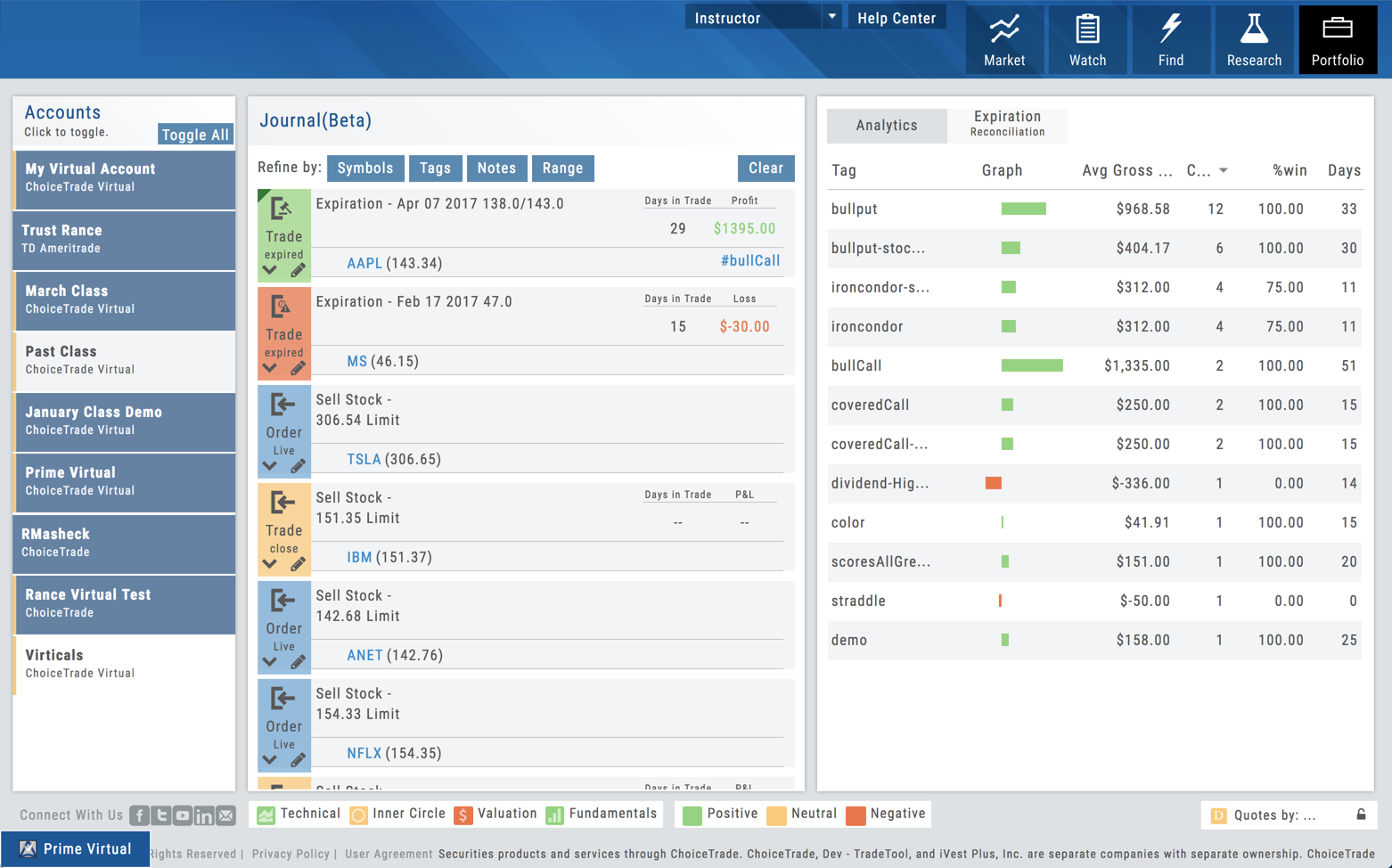
Journal Tag Analytics
Want to know how effective your trading strategies and practices are? This is where you’ll get your answers Get visual [...]
Posted in Location, Journal, Uncategorized, Trade Journal
Tagged trading, menu, How to, journal
Comments Off on Journal Tag Analytics
Updating Journal Entries
Updating closed or adjusted trades in the Journal Tab is easy by the following steps: 1. Go to the Order [...]
Posted in Portfolio, Order Status, Journal, Trade Journal
Tagged trading, trade journal
Comments Off on Updating Journal Entries
Create Notes to Keep Organized
Notes are easily created throughout the Platform. Anywhere you see a Smart (Action) Icon , you can create a Note to [...]
Tag Results-Table Summary Totals
Located below the Analytics Tab in the Journal, the Tag Result Table Summary displays trade performance by Date Range, Total P/L, [...]
Insight Tab in Journal
The Insight Tab, along with Tags and Graphs update dynamically with the account(s), symbol(s), tag(s) and/or date range selected. Insight [...]
P/L & Duration/Timeline Graphs
Journal Trade Graphs This tab offers two views of your Closed, Matched or Reconciled trades: P/L by Trade Duration and [...]
Add New #tags and Auto-Tagging
Trade Finder Scans have #tags that will automatically appear on the corresponding trade tabs in the Journal, such as #BullCall, [...]
Posted in Portfolio, Journal, Trade Journal
Tagged trading, menu, trade journal
Comments Off on Add New #tags and Auto-Tagging
Backtest from the Journal
You can “Replay” a trade from your Journal by sending it to Backtest Analysis. Click on the icon on the Journal [...]
Posted in Portfolio, Account, Journal, Options - Backtesting, Trade Journal
Tagged navigation, menu, How to, journal, backtesting
Comments Off on Backtest from the Journal
Save Backtested Trades to Manual Account
Want to keep record of backtested trades? Send them to the Manual Account. While in Backtest Mode, structure your [...]
Posted in Portfolio, Account, Journal, Options - Backtesting, Trade Journal, Trading
Tagged navigation, menu, How to, journal, portfolio, backtesting, trade, manual account
Comments Off on Save Backtested Trades to Manual Account
Delete Journal Entries
Whether you entered a trade incorrectly, or want to remove Cancelled Orders from your Virtual or Manual Account, you have the [...]
Posted in Portfolio, Account, Journal, Trade Journal, Trading
Tagged navigation, menu, How to, journal, virtual trade, portfolio, brokerage, trade, manual account
Comments Off on Delete Journal Entries
Journal – Color Tagging
After Reconciling your closed trades, click “OK” to have the Journal entries updated. Yellow tag: There was a change in [...]
Posted in Journal, Trade Journal
Tagged navigation, menu, How to, journal, color tagging
Comments Off on Journal – Color Tagging
Other Navigation
Icons = Navigation The Action (Arrow) icon will provide different actions depending on where you are in the platform. For [...]
Posted in Market, Journal, Stock Research, Navigation, Options - Strategies
Tagged navigation, menu, How to, options, find, market, trade, analyze
Comments Off on Other Navigation